Deposit to X666 Game
Three ways to fund your X666 wallet - JazzCash, EasyPaisa, or a straight bank transfer - and two of the three land in minutes. Pick your method below for exact steps, or scroll to the limits table and troubleshooting further down if you already know the drill.
| Method | Minimum deposit | Minimum withdrawal | Typical speed |
|---|---|---|---|
| JazzCash | Rs. 100 | Rs. 100 | A few minutes |
| EasyPaisa | Rs. 100 | Rs. 100 | A few minutes |
| Bank Transfer | Rs. 500 | Rs. 500 | Up to a few hours |
These are the standard floors as of this writing - the in-app deposit screen for your chosen method is the one place that's always current, so give it a glance before sending anything.
Deposit Steps by Method
Every method follows the same shape underneath - wallet, method, amount, confirm - but the screens differ enough that it's worth walking through each one separately below.
Sign into X666
Any of the three platforms works here - phone, browser, PC client - just get logged into your account first.
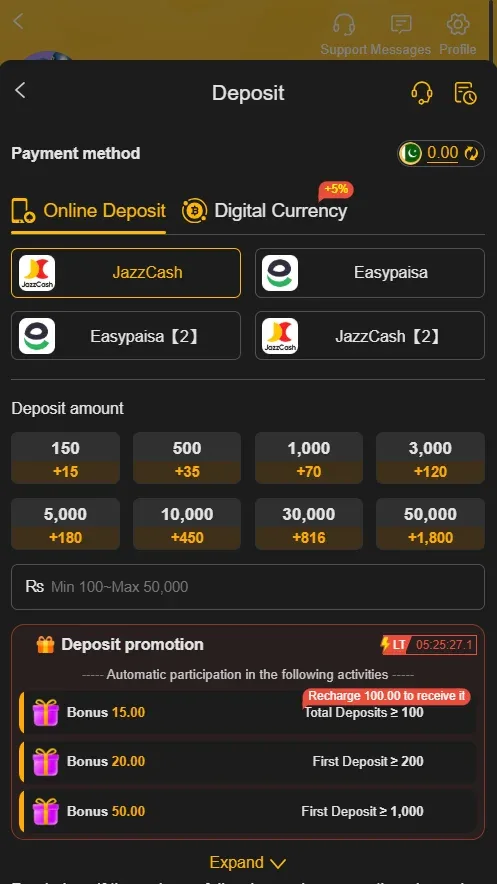
Tap your wallet, then Deposit
Your balance sits front and center on the home screen - tap it, then choose Deposit (sometimes labeled Recharge).
Pick JazzCash from the method list
The screen that follows shows the account number to send funds to.
Type in how much you're adding
Rs. 100 is the floor for JazzCash. Give the number a once-over before moving forward.
Finish it from inside JazzCash
Jump over to your JazzCash app, send the exact figure shown, and authorize with your MPIN. Let JazzCash confirm success on its end before you switch back - X666's wallet picks up the new balance within a few minutes on its own.
Log into your X666 account
Same starting point regardless of method.
Open your wallet and choose Deposit
Tap the balance shown on your home screen, then Deposit or Recharge.
Choose EasyPaisa
Selecting it brings up the destination account details for that session.
Set your amount
Rs. 100 minimum, same as JazzCash - the app will also show you the current ceiling for this method.
Pay it off in EasyPaisa
Match the amount exactly, confirm with your EasyPaisa PIN, and wait for that app to show the transaction went through. Back in X666, the balance should be updated within a few minutes.
Get logged into X666
Same first step as the other two methods.
Wallet → Deposit
Tap through from your balance on the home screen.
Choose Bank Transfer
You'll get an account number, the bank's name, and the title to send under. Rs. 500 is the minimum for this route.
Send the exact figure via your own bank
Whatever banking app or internet banking portal you use, make sure the amount matches what you entered in X666 down to the rupee.
Hold onto your reference number
Outside normal banking hours especially, this can take a few hours to clear. Keep the reference handy in case support needs it later.
Comparing the Three Methods
JazzCash: the default pick for most people - a straightforward wallet-to-wallet transfer, usually settled in a handful of minutes, Rs. 100 to get started.
EasyPaisa: functionally a mirror of JazzCash - same speed, same Rs. 100 floor, comes down to which app you already have set up.
Bank transfer: the outlier - Rs. 500 minimum, and processing time depends entirely on your bank rather than X666. Useful as a fallback if neither mobile wallet is an option for you.
X666 itself doesn't tack on a deposit fee for any of the three - whatever charge shows up, if any, is coming from JazzCash, EasyPaisa or your bank's own transfer fees.
If Your Deposit Doesn't Reflect
Payment confirmed on your end, but the X666 balance hasn't moved: give it a few minutes before worrying - that covers most cases. Past an hour for JazzCash/EasyPaisa, or several hours for a bank transfer, that's when it's worth pinging support with your transaction ID.
The number in your wallet looks wrong: go back and compare what you actually sent against what you meant to send - a mistyped figure on the payment-app side is by far the usual culprit.
Your payment app is showing "pending" or "failed": that generally means the funds haven't actually left your account yet. Let the payment app resolve it on its own first - a failed JazzCash or EasyPaisa transaction simply never reaches X666 to begin with, so there's nothing for X666 support to fix in that case.
Sent it twice by accident: both transfers should show up as separate entries in your wallet within the normal window. Only seeing one? That's a support ticket, with both transaction IDs attached.
Whatever the issue, come prepared: your registered number, the transaction ID, the exact figure, and roughly when it happened. Support moves a lot faster with those four things than with a vague description.
Your Download Bonus and Depositing
No deposit needed to unlock the Rs. 100-999 download bonus - that lands automatically once registration and verification are done. A deposit afterward is just your own money going into the same wallet, on top of it.
Bonus balance and wagering
Download bonus, referral payouts, daily rewards - all of it typically comes with a playthrough requirement attached before it (or anything won using it) can be withdrawn. Since bonus and deposited funds sit in the same wallet once you start playing, they tend to blend together - which is exactly why it's worth reading the offer terms before betting, not after you've already burned through the bonus. The withdrawal guide covers how this plays out at cashout time.
Deposit Safety
Stick to the payment options built into the deposit screen. If someone contacts you directly asking for a transfer - claiming to be X666 staff or not - that's not a legitimate deposit channel.
"Unlock fee" requests are always a scam. No deposit on X666 ever needs an extra payment to release it - this specific con shows up across real-money apps in Pakistan generally, not just here.
Deposit through an account that's actually yours. It's not just tidiness - it directly determines how cleanly your withdrawal goes later.
Decide your deposit ceiling before you start, not mid-session. Every rupee in should be money you're prepared to lose. You need to be 18+ to use X666 at all.
Funded and Ready
Balance updated? Head to the games list or double-check the bonus terms before your first bet. Haven't registered yet? Start with creating an X666 account.