Login to X666 Game
Signing back in to your X666 Game account only takes a few seconds once you know where the sticking points usually are. This guide covers the login steps, password reset, and fixes for the errors players run into most.
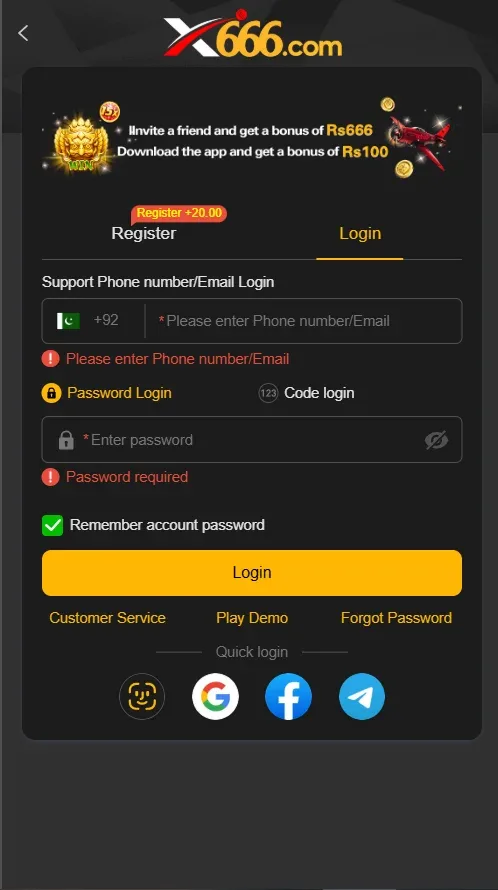
Step-by-Step Login
If you've already registered, logging back in is straightforward on the app, mobile website, or PC client alike.
Forgot Password / OTP Reset
A forgotten password doesn't put your account or balance at risk - the reset flow verifies you through OTP rather than requiring the old password.
Step 1: On the login screen, tap "Forgot Password."
Step 2: Enter your registered mobile number or email - the same one your account was created with.
Step 3: Request the OTP and enter the code once it arrives.
Step 4: Set a new password. Avoid reusing an old one, and pick something you haven't used on another app or site.
Step 5: You'll be logged in automatically with your new password - no need to log in a second time.
Troubleshooting Login Issues
Wrong OTP / OTP not accepted: codes expire after a short window, so a delayed entry can fail even if it was typed correctly. Request a fresh code with Resend and enter it immediately rather than reusing an older message.
"Account not found": almost always a mismatch in the number or email entered - check for a typo, a missing digit, or the wrong country code. If you're confident the details are right, you may have originally registered with a different identity than the one you're trying now.
Changed phone number: if you still have brief access to your old number, log in and update it in account settings before it's disconnected. If you've already lost access, contact support with your account details and recent transaction history so they can verify ownership and update it manually.
App stuck on splash screen: close the app fully and reopen it, and check that you have a working internet connection - the app needs a live server connection to load past the splash screen. If it persists, clear the app's cache under Settings → Apps, or reinstall the latest APK from the download page.
"Incorrect password" despite typing it correctly: passwords are case-sensitive and autocorrect on some keyboards can silently capitalize the first letter - check for that before assuming you've forgotten it, or just use Forgot Password to reset it cleanly.
Login works on app but not web (or vice versa): clear your browser cache or update the app to the latest version, since an outdated build occasionally causes session errors that a fresh login clears.
Security Tips
Don't reuse passwords. Use a password for X666 Game that you haven't used on any other app or site, so a breach elsewhere can't expose your wallet.
Log out on shared devices. Always log out after playing on a family member's phone, a shared computer, or any device you don't fully control.
Never share your OTP or password. Legitimate X666 support will never ask for either over chat, call, or email - treat any such request as a scam attempt.
Keep your registered number current. Update it in account settings if you switch SIMs, since it's your main path back into your account if you ever forget your password.
Signed In?
Head to the deposit page to fund your wallet, or register a new account if you're setting up X666 Game for the first time.